
Avant
Avant, LLCFinance
4.75.41K Reviews
- Version
- 4.7.0
- Installs
- 500.00K
- Age Rating
- Everyone
Screenshots
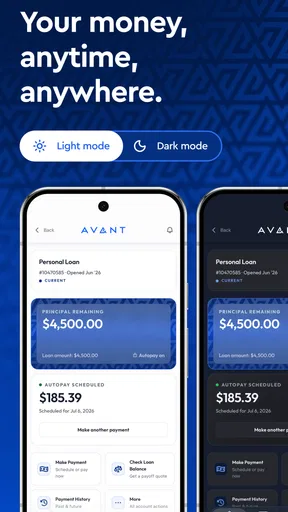
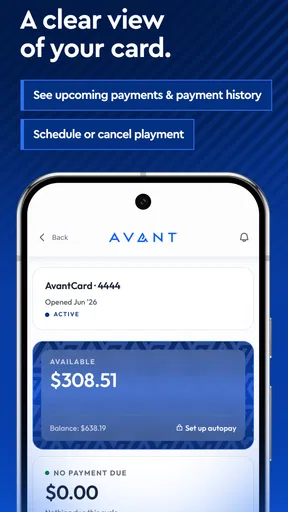
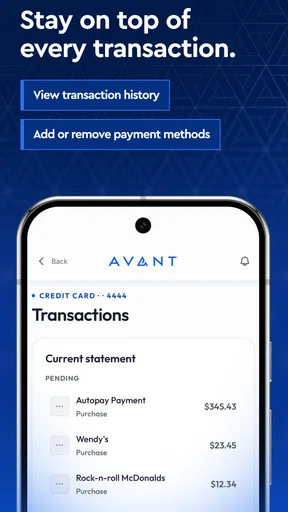
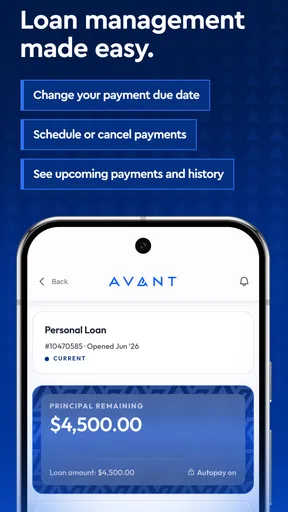
Our Review of Avant
 Analysis by Appyee
Managing a card or loan from a phone sounds simple until you need to check a transaction while you are away from home, make a payment before the day gets busy, or work out why a balance looks different from what you expected. Avant is built for those small but important moments. I tested it as a finance app from Avant, LLC, and found that its main value is not flashy budgeting tools; it is the convenience of bringing routine account actions into one mobile place.
The app is free to install and is rated for Everyone, which makes its presentation approachable rather than intimidating. Its focus is narrow enough to be useful: payments, transaction viewing, and basic management for an Avant card or loan. That focus is also the first thing to understand. This is not a replacement for a full bank app, a general-purpose budgeting service, or a complete financial planning platform. It works best when you already use an eligible Avant product and want a quicker way to stay in touch with it.
How Avant feels when your connection is part of the experience
When I use Avant, I think of the connection as part of the workflow, not just a background detail: current account information and payment actions depend on the app being able to reach its service. I find it helps to choose a moment when I can pause and let a screen finish loading, rather than squeezing a payment into a rushed transition. That small change makes it easier to check the outcome before moving on.
Useful when a payment cannot wait
The strongest use case is a familiar one. Imagine checking your finances during a lunch break and realizing that a payment needs attention. Instead of waiting until you are back at a computer, you can open Avant, review the relevant account area, and handle the task from your phone. That convenience matters because financial chores are often postponed not because they are difficult, but because they are inconvenient.
In my experience, the app makes most sense as a quick-check tool rather than something you leave open for long sessions. I would use it to confirm recent activity, look over a balance, or make a payment, then close it. The experience is shaped by the quality of the connection because these actions depend on current account information. A slow or unstable network can turn a short task into a waiting exercise, especially when you are trying to confirm that an action has completed.
That network dependence is not a reason to avoid the app, but it changes how I use it. I prefer to open it before I am rushing through a checkout line or boarding transport. If I know I need to make a payment, I do it while I have a reliable connection and enough time to verify the result. That simple habit reduces the chance of closing the app too early and later wondering whether the request went through.
Designed for mobile moments, not deep financial planning
Avant fits naturally into short mobile sessions. Its purpose is practical, and the small-screen setting helps when you want account access without opening a laptop. I can see why someone would check it while commuting, between errands, or after receiving a reminder about a bill. A phone is usually closer than a computer, and that lowers the effort required to keep up with a card or loan.
There is a trade-off, though. A mobile account app is not automatically a complete financial workspace. If you want to compare several accounts, build a detailed spending plan, or examine long-term financial patterns, a dedicated budgeting app or a bank dashboard may be more suitable. Avant is more focused on the account relationship it manages. I would not choose it as my only finance app unless my main need was specifically to manage an Avant card or loan.
The app is also more useful when your phone is secure and personal. I would avoid signing in while connected to an unfamiliar public network if I could wait, particularly for a payment-related task. This is not unique to Avant; it is sensible behavior for any app that exposes financial information. A private connection and a few uninterrupted minutes make the experience calmer and reduce avoidable mistakes.
What happens when the network is slow or interrupted
The most important limitation is the one that comes with any connected finance service: the app needs to communicate with its service before it can show current account activity or process an account action. If the connection drops while a screen is loading, the useful response is usually to wait rather than repeatedly tap buttons. Repeated attempts can create confusion about whether you submitted the same request more than once.
My practical approach is to separate checking from acting. First, I wait for the account screen or transaction information to load. Then I review the details. Only after that do I start a payment or another important action. If the network becomes unreliable during the process, I stop, reconnect, and check the account history or status before trying again. This workflow is less exciting than simply tapping through, but it is much safer for financial tasks.
A failed connection can also make old information feel more current than it really is. If the app cannot refresh, I would not treat the last visible balance or transaction list as proof that nothing has changed. That is especially important when you have recently made a payment elsewhere or are waiting for a transaction to appear. The app is valuable because it can centralize account activity, but the value depends on allowing it time to retrieve fresh information.
Recovery habits that make the app less frustrating
When Avant does not respond as expected, I would begin with the basics: check whether the phone has a stable connection, move from a weak signal to a more reliable one, and reopen the relevant screen only after the connection improves. If an action involved a payment, I would verify the account activity before submitting it again. That small pause is the most useful recovery habit I can recommend.
It is also worth keeping your phone software and the app itself reasonably current. The current version is 4.7.0, and the app supports devices running Android 6.0 or later. That broad compatibility is helpful for people who keep an older phone, although an older device may still feel slower when loading account screens or switching between apps. If the app is installed on a phone that struggles generally, the problem may be the device or connection rather than the account interface alone.
For a serious issue, I would record what happened before trying to fix it: the approximate time, the screen I was using, and whether the account information had refreshed. That gives you a clearer starting point if you need assistance. I would not rely on a screenshot of an old screen as evidence that a payment completed; the important distinction is between seeing a confirmation step and seeing the resulting account activity.
Using less data without losing the point of the app
Because Avant is meant for occasional account management, it does not need to become a constant background habit. I would open it when I have a specific reason, complete the check, and leave it closed. That approach is useful for conserving mobile data and battery, but it also keeps financial checking purposeful instead of turning every spare moment into a balance refresh.
For routine reviews, I would choose Wi-Fi when it is trustworthy and available. For urgent actions, I would use the strongest connection I can find rather than delaying a needed payment solely to save a small amount of data. The better balance is to avoid unnecessary repeated loading while still giving important account tasks enough time to finish correctly.
Another good habit is to decide what you need before opening the app. If the goal is to inspect a recent transaction, go directly to that task instead of repeatedly refreshing several screens. If the goal is to make a payment, have the necessary information ready and leave time for confirmation. This is a small workflow improvement, but it reduces both data use and the temptation to tap through an uncertain connection.
Where Avant beats the usual alternatives
Compared with visiting a website in a mobile browser, a dedicated app can feel more direct for repeated account tasks. You avoid starting from a browser tab and can go straight to the service you use. For someone who regularly manages an Avant card or loan, that focused access is the main advantage. The app also keeps the experience centered on the relevant account rather than surrounding it with unrelated banking products.
Compared with a general bank app, however, Avant is not necessarily the better all-in-one choice. A bank app may be more useful if you need checking, savings, transfers, deposits, and broader account visibility in one place. Compared with a budgeting app, Avant is also less appropriate for people whose priority is categorizing spending across several providers. I would pair it with those tools rather than expecting it to replace them.
The key comparison is therefore about purpose, not a simple quality ranking. If your financial life includes an Avant card or loan and you want mobile access to its routine management, the focused design is a strength. If you are searching for a universal finance dashboard, the same focus becomes a limitation. Choosing it makes sense when the product relationship comes first.
Who should use it, and who should skip it
I would recommend Avant to an existing customer who wants a convenient way to view transactions and manage payments from a phone. It is especially suitable for someone who handles financial chores in short bursts and values access away from a desktop. The app has a 4.7 average from around 58 thousand ratings, and its audience has passed 500 thousand installs, which suggests that its basic mobile approach has found a substantial user base.
I would be more cautious if you are looking for a financial education tool, a detailed spending analyzer, or a single app for every account you own. Those needs call for a broader service. I would also skip it if you do not have an Avant card or loan to manage, since the app’s usefulness is tied closely to that relationship rather than to general personal finance.
Privacy and security habits matter as much as convenience. I would use a screen lock, avoid leaving the account open on a shared phone, and sign out or secure the device when someone else may access it. These are ordinary precautions, but they are particularly important when an app brings payment and transaction information into a portable device.
My final view on Avant’s connected experience
Avant succeeds when I treat it as a focused account-management companion. It makes sense for checking activity, handling a payment, and staying connected to an Avant card or loan during ordinary mobile moments. Its free availability and Everyone age rating lower the barrier to trying it, while Avant, LLC keeps the app tied to a specific financial service rather than presenting it as a general-purpose money manager.
The main friction is not complicated navigation so much as the need for a dependable connection and careful confirmation. A weak network can interrupt the exact tasks for which the app is most useful, so I would avoid rushing through payments on an unstable signal. I would also remember that the app is not a substitute for a complete bank or budgeting platform.
Overall, Avant is a sensible choice for eligible customers who want their routine account tasks close at hand. I would recommend it to a friend who already uses Avant and wants a straightforward mobile way to stay informed. I would point someone with broader planning needs toward a more comprehensive finance tool, while keeping Avant as the dedicated companion for its card or loan.
After its release on February 11, 2020, the app has remained a focused finance option rather than trying to become everything at once. That restraint is its clearest strength. If your goal is quick, connected access to an Avant account, it earns a place on your phone; if your goal is complete financial control across many providers, look beyond it.
Verdict
Strengths of Avant
- Clean interface makes browsing and managing content straightforward.
- Fast navigation keeps common actions responsive on most devices.
- Useful organization tools help users find saved items quickly.
- Regular updates can improve stability and add practical refinements.
- Works well for users who prefer a focused, uncluttered experience.
Limitations of Avant
- Some advanced features may require a paid subscription.
- Initial setup can take time before the app feels fully personalized.
- Options for customization may be limited for experienced users.
- Performance can vary on older phones or devices with little storage.
- Support information may not be detailed enough for difficult issues.
Similar Picks in This Category
View All
Google Wallet
Google LLC4.3

Airtel: Recharge, Bank & Loans
Airtel4.0

PayPal - Pay, Send, Save
PayPal Mobile4.2

DANA Indonesia Digital Wallet
PT Espay Debit Indonesia Koe4.5

Binance: Buy Bitcoin & Crypto
Binance Inc.4.8

Cash App
Block, Inc.4.7
Frequently Asked Questions
What is Avant, and what can I use it for?
Avant is an application designed to provide users with a convenient way to access its main services and features from a mobile device. Depending on the version and platform, it may help you manage information, interact with content, or complete everyday tasks more efficiently. Before downloading, check the official description to confirm that its functions match your needs and region.
Is Avant free to download and use?
Avant may be available as a free download, but some features, services, or content could require payment, a subscription, or an account upgrade. Availability can also vary between Android and iOS. We recommend reviewing the app-store listing carefully, including in-app purchase details and subscription terms, so you understand any possible charges before creating an account or using premium functionality.
Does Avant require an account or personal information?
Depending on the features you want to use, Avant may ask you to register with an email address, phone number, or other personal details. Certain functions might also require permission to access notifications, storage, location, or other device services. Only provide information that is necessary, read the privacy policy, and review the requested permissions before accepting them.
Is Avant safe to install on Android and iOS devices?
Avant should be downloaded only from a trusted source such as Google Play or the Apple App Store. These platforms provide security checks, although no application is completely risk-free. Before installing, verify the developer name, user reviews, update history, and requested permissions. Keep your operating system updated and avoid unofficial APK files or modified versions that may compromise your device.
What should I do if Avant does not work correctly?
If Avant crashes, loads slowly, or fails to provide a feature, first check your internet connection and make sure the application is updated. Restarting the app or device may also help. If the problem continues, review the app’s support section or contact the developer through the official store listing. Avoid sharing passwords or sensitive information when requesting technical assistance.
